Understanding UX and UI in Web Design
What is User Experience (UX)?
User Experience (UX) refers to the overall experience a user has while interacting with a website. It encompasses all aspects of the interaction, from navigation to accessibility and content structure. A well-designed UX ensures that users find what they need quickly and efficiently, leading to higher satisfaction and engagement.
What is User Interface (UI)?
User Interface (UI) is the visual aspect of web design, including the layout, color schemes, typography, and interactive elements. UI design focuses on making the website visually appealing and easy to use. It involves creating a consistent and intuitive interface that guides users through the website seamlessly.
Importance of UX/UI in WordPress Websites
Enhancing User Satisfaction
A website with excellent UX/UI design enhances user satisfaction by providing a smooth and enjoyable browsing experience. Users are more likely to stay longer on a site that is easy to navigate and visually appealing, leading to increased engagement and lower bounce rates.
Improving Accessibility
Accessibility is a critical aspect of UX/UI design. Ensuring that your WordPress website is accessible to all users, including those with disabilities, not only broadens your audience but also complies with legal requirements. Features like screen reader compatibility, keyboard navigation, and alt text for images are essential for an inclusive web design.
Boosting Conversion Rates
A well-designed UX/UI can significantly boost conversion rates. By creating a user-friendly interface that guides visitors through the conversion funnel, whether it’s making a purchase, filling out a form, or subscribing to a newsletter, you can enhance your website’s effectiveness in achieving its goals.
Related: WordPress Website Services
Key UX/UI Principles for WordPress Design
Consistency and Simplicity
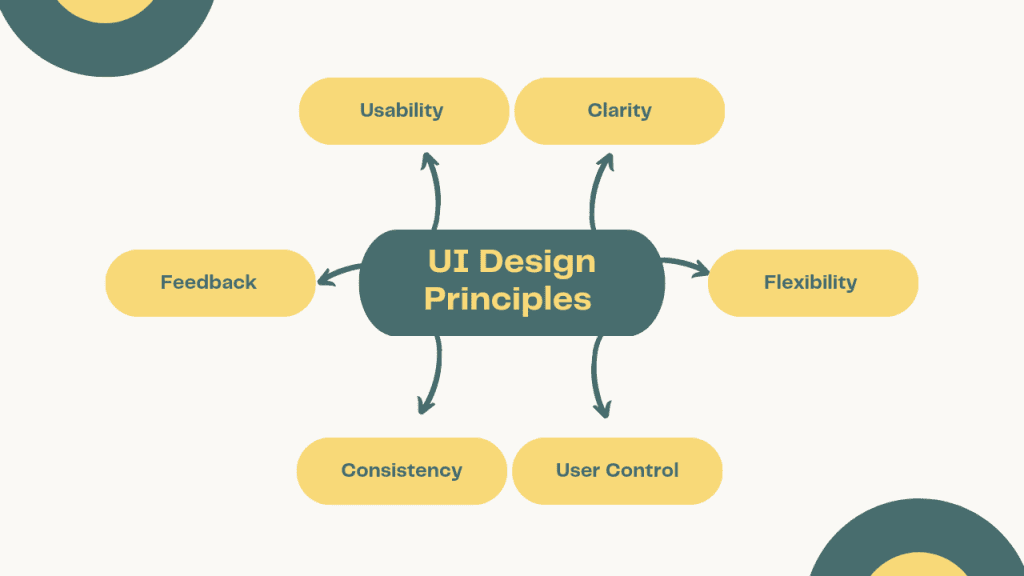
Consistency in design elements, such as fonts, colors, and button styles, creates a cohesive look and feel, making the website easier to navigate. Simplicity, on the other hand, ensures that the design is uncluttered and straightforward, allowing users to focus on the content without distractions.
Mobile Responsiveness
With the increasing use of mobile devices, your WordPress website must be fully responsive. This means the site should adapt seamlessly to different screen sizes and orientations, providing an optimal user experience across all devices.
Fast Loading Speeds
Loading speed is a critical factor in UX/UI design. Slow-loading websites can frustrate users and lead to higher bounce rates. Optimizing images, using efficient coding practices, and leveraging caching can help improve your site’s loading times.
Intuitive Navigation
Intuitive navigation helps users find what they’re looking for quickly and easily. A clear and well-structured menu, along with breadcrumbs and a search bar, can enhance the overall user experience by making the website easier to explore.
Best Practices for Implementing UX/UI in WordPress
Choosing the Right Themes and Plugins
Selecting the right WordPress themes and plugins is essential for effective UX/UI design. Look for themes that are responsive, customizable, and optimized for speed. Plugins like Elementor and WPBakery can help you create a visually appealing and user-friendly interface without extensive coding knowledge.
Utilizing Wireframes and Prototypes
Wireframes and prototypes are valuable tools in the UX/UI design process. They allow you to visualize the layout and functionality of your website before diving into development. Tools like Sketch, Figma, and Adobe XD can help you create detailed wireframes and interactive prototypes.
Testing and Iteration
Testing is a crucial part of the UX/UI design process. Conduct user testing to gather feedback and identify areas for improvement. Use tools like Google Analytics and Hotjar to track user behavior and make data-driven decisions. Iteration is key to refining your design and ensuring it meets user needs.
Case Studies: Successful UX/UI in WordPress Websites
Example 1: E-commerce Site
An e-commerce site with excellent UX/UI design focuses on ease of navigation, quick load times, and a streamlined checkout process. For example, using WooCommerce with a responsive theme like Astra ensures that users have a smooth shopping experience on any device.
Example 2: Portfolio Site
A portfolio site should highlight visual content and provide an intuitive navigation structure. Using a theme like Divi, with its drag-and-drop builder and customizable layouts, can help create a stunning and user-friendly portfolio site.
Example 3: Blog Site
A well-designed blog site prioritizes readability and ease of navigation. Themes like GeneratePress, combined with plugins like Yoast SEO, can enhance the user experience by ensuring the content is well-organized and easy to find.
Tools and Resources for UX/UI Design in WordPress
Design Tools
- Sketch: A powerful design tool for creating wireframes and prototypes.
- Figma: A collaborative design tool that allows for real-time collaboration and prototyping.
- Adobe XD: An all-in-one design tool for wireframing, prototyping, and sharing designs.
Testing Tools
- Google Analytics: Tracks user behavior and provides insights into website performance.
- Hotjar: Offers heatmaps, session recordings, and feedback polls to understand user interactions.
- UsabilityHub: Conducts user testing to gather feedback and improve design elements.
Learning Resources
- Smashing Magazine: Offers articles and tutorials on web design and development.
- A List Apart: Provides insights and best practices for web design and UX.
- WordPress Codex: The official documentation for WordPress, offering guides and tutorials.
Conclusion: The Future of UX/UI in WordPress Design
Emerging Trends
As technology evolves, so do UX/UI design trends. Keep an eye on emerging trends like voice user interfaces (VUIs), augmented reality (AR), and artificial intelligence (AI) in web design to stay ahead of the curve.
Staying Ahead in Web Design
Staying updated with the latest design trends and best practices is essential for maintaining a competitive edge. Continuous learning and adaptation will ensure your WordPress website remains user-friendly and engaging.
At CodeCircle.net, we specialize in WordPress web design services in Surf City, North Carolina. Our team of experts is dedicated to creating user-centric websites that not only look great but also deliver an exceptional user experience. Contact us today to learn more about how we can help you elevate your web design.